
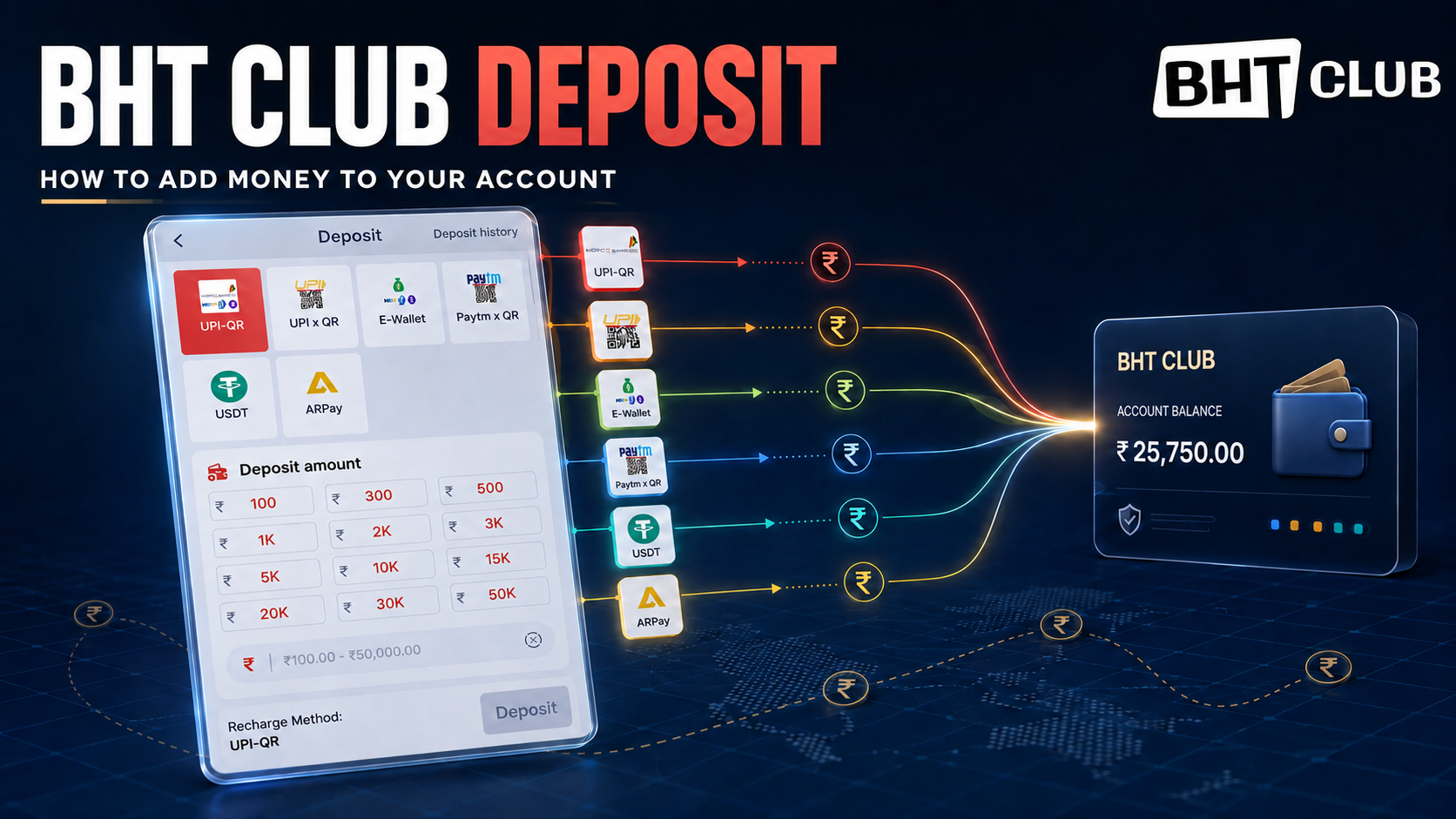
BHT Club Deposit: How to Add Money to Your Account
Making a BHT Club deposit is simple when you follow the payment screen carefully. BHT Club provides several recharge methods, including UPI QR, E-Wallet, Paytm QR and USDT. You can select a ready-made amount or enter a custom amount within the limit displayed on your screen.
Always check the receiver details, payment amount and deposit order before transferring money. A small mismatch can delay the balance update.
BHT Club Register Instructions
The payment options available on your account may change depending on system availability.
| Deposit method | How it works |
|---|---|
| UPI QR | Scan the generated QR code using a supported UPI app |
| E-Wallet | Complete the transfer through an available digital wallet |
| Paytm QR | Scan the payment QR using Paytm or a compatible UPI app |
| USDT | Transfer cryptocurrency using the exact supported network and address |
Never send money to a payment address received through an unknown message, social media account or unofficial group. Use only the payment information generated inside your BHT Club account.
How to Deposit Money in BHT Club
Step 1: Open the BHT Club Website
Visit BHT-CLB.com using your mobile browser. Check the complete address before entering your login information.
Log in with your registered mobile number or email address and password. The normal login page does not require an OTP.
Step 2: Open the Deposit Page
After logging in, go to your account or wallet section and select Deposit, Recharge or Add Cash.
The BHT Club deposit screen will show the currently available payment methods.
Step 3: Choose a Payment Method
Select your preferred option:
- UPI QR
- E-Wallet
- Paytm QR
- USDT
Choose a method you can access immediately. Do not create a deposit order if you are not ready to complete the payment within the given transfer time.
Step 4: Select the Deposit Amount
The deposit page may provide ready-made amounts such as:
- ₹100
- ₹300
- ₹500
- ₹1,000
- ₹2,000
- ₹3,000
- ₹5,000
- ₹10,000
- ₹15,000
- ₹20,000
- ₹30,000
- ₹50,000
You may also enter a custom amount in the amount box. According to the displayed deposit page, the accepted range is ₹100 to ₹50,000. The limit can change, so always follow the amount shown on your account.
Step 5: Create the Deposit Order
After entering the amount, press the available Deposit, Recharge or Submit button.
The system should generate the payment instructions, QR code, wallet details or USDT address. Review every detail before continuing.
Step 6: Complete the Payment
Pay the exact amount shown in the deposit order.
For example, if you create a deposit order for ₹500, transfer exactly ₹500. Do not send ₹499 or ₹501 because a different amount may not be credited automatically.
When using a QR method:
- Open your preferred UPI or payment app.
- Scan the QR code generated by BHT Club.
- Confirm the receiver and amount.
- Complete the payment before the order expires.
- Keep the transaction receipt or screenshot.
Never scan a QR code sent by an unknown person claiming to be customer support.
Step 7: Wait for Account Confirmation
After payment, return to the BHT Club deposit page. Do not cancel the deposit order after transferring the money.
The account balance may update after the payment is confirmed. Processing time can depend on the payment provider, bank connection and network status.
Step 8: Check Deposit History
Select Deposit History at the top of the page to review your recharge order.
Check the following information:
- Deposit amount
- Order number
- Payment method
- Order time
- Current status
- Successful or pending confirmation
A successful order should appear as completed. If it remains pending, keep your transaction details ready before contacting support.
Important BHT Club Recharge Instructions
Follow these rules to avoid common deposit problems:
- Transfer the exact amount stated in your order.
- Complete the transfer before the payment time expires.
- Do not cancel an order after sending the money.
- Do not reuse an old QR code, wallet address or deposit order.
- Create a new deposit form if the previous transfer time has expired.
- Confirm all receiver details before paying.
- Keep the transaction ID and payment screenshot.
- Never share your password, OTP, UPI PIN or wallet security code.
- Do not make a second payment while the first transaction is still processing.
If you accidentally send the wrong amount, automatic credit may fail. Keep the payment proof and contact the support option displayed inside your account.
How to Deposit Using USDT
Make sure +91 is selected and enter only the 10-a
USDT deposits require extra attention because cryptocurrency transfers normally cannot be reversed.
Before sending USDT:
- Select USDT on the deposit page.
- Check the supported network, such as TRC20 or another network displayed by the system.
- Copy the deposit address carefully.
- Confirm the minimum required amount.
- Paste the address into your crypto wallet.
- Select the same network shown on the BHT Club page.
- Review the address, network and amount before confirming.
- Save the transaction hash after sending.
The sending and receiving networks must match. For example, do not send USDT through ERC20 when the deposit page asks for TRC20. Using the wrong network can result in the funds being lost.
digit Indian mobile number in the main field. Remove spaces, dashes and a second country code.
What to Do If a BHT Club Deposit Is Pending
A payment can remain pending because of bank delays, an expired order, an amount mismatch or a slow payment network.
First, check your Deposit History. If the balance is still not updated, prepare:
- Your BHT Club account ID
- Deposit order number
- Exact amount transferred
- Date and time of payment
- UPI or wallet transaction ID
- Clear payment screenshot
- Crypto transaction hash, if you used USDT
Use the support channel available inside your account. Share only the information needed to identify the payment. Never provide your password, OTP, UPI PIN, card PIN or crypto-wallet recovery phrase.
Deposit Carefully
The BHT Club deposit process is straightforward when you select the correct method, enter the exact amount and complete the transfer before the order expires. Always check your deposit history and keep the transaction receipt until the balance is confirmed.
Only adults who meet the legal age requirement should use payment-based gaming services. Check the rules that apply in your location, set a fixed entertainment budget and never deposit money required for food, rent, bills, education or emergencies.