
BHT Club How to Login: Simple Account Access Guide
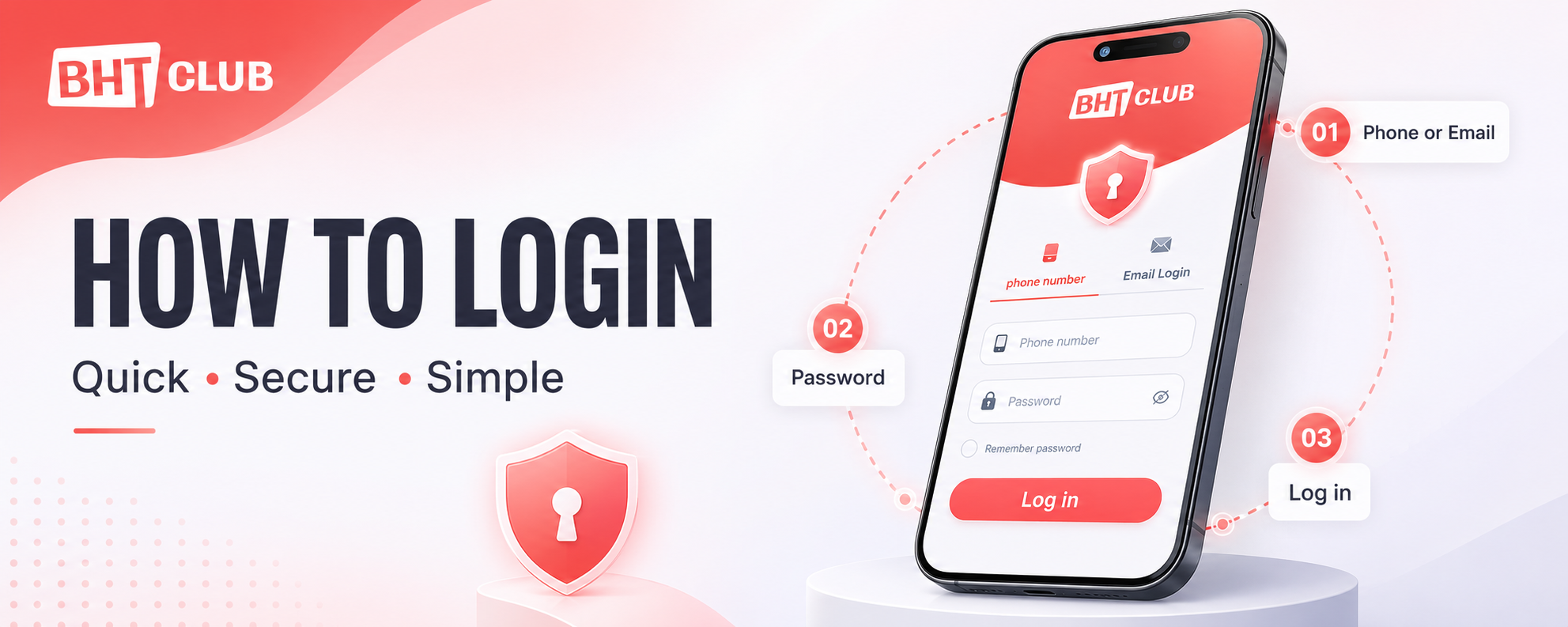
Searching for BHT Club How To Login instructions? If you already have an account, you can sign in with the phone number or email address connected to it. You only need your registered login detail and password. The login screen shown here does not ask for an OTP.
Quick login: Choose Phone Number or Email Login, enter the detail registered with your account, type your password, and press Log in.
Before You Log In
Take a few seconds to confirm that you have opened the correct login page. Start from the login link currently published on BHT-CLB.com, then check the full destination address before entering your password. A copied page can use the same logo, colours and button names, so the address bar matters more than the design.
Keep the phone number or email used during registration ready. You will also need the password created for that account. If you enter a new phone number or an email that is not connected to the account, the login will not work.

Bht Club How To Login with a Phone Number
Step 1: Select the Phone Number Tab
The login screen normally opens on the Phone Number tab. You can identify it by the red underline below the tab name. If Email Login is selected, tap Phone Number before entering your details.
Step 2: Check the Country Code
The country-code box appears beside the mobile-number field. Indian users will usually see +91. Check this code before typing your number, especially if the field was changed during an earlier visit.
Step 3: Enter Your Registered Mobile Number
Type the same mobile number that you used to create the account. Check every digit before moving to the password field. Do not enter another number simply because it is active on your current phone; the number must be the one connected to the BHT Club account.
Step 4: Enter Your Password
Tap the Password box and enter your existing account password. Passwords are case-sensitive, so capital letters, small letters, numbers and symbols must be entered in the same way as when the password was created.
The eye icon at the right side of the field can help you check what you typed. Use it only when nobody else can see your screen, then hide the password again.
Step 5: Choose Whether to Remember the Password
The Remember password option is optional. Select it only on your own protected phone or computer. Leave it unselected on a shared device, office computer, cybercafé system or another person’s phone.
Step 6: Press Log In
After both fields are complete, tap the Log in button once. Give the page a moment to check the details. Repeated tapping can slow the process or send the same request more than once.
If the button still looks grey, check that the phone-number and password fields are not empty and that the mobile number contains all required digits.
How to Log In with Email
Choose Email Login if your BHT Club account was registered or later connected to an email address. Tap the tab with the envelope icon, enter the email linked to the account, type the correct password and press Log in.
Check the email spelling carefully. A missing letter, an extra space or the wrong ending—such as .com entered incorrectly—can prevent access. If you originally registered only with a phone number and did not connect an email, return to the Phone Number tab.
Bharat Club How to Login: Use Your Existing Account Details
People may also search for Bharat Club How to Login when they need help reaching their account. Start from the login link published on BHT-CLB.com, choose the phone-number or email option connected to your account, enter your password and press Log in. Do not create a second account if you have simply forgotten your password; use Forgot password instead.
Phone Number or Email: Which One Should You Use?
Use the method already connected to your account. The two tabs are different ways to reach an existing account; they do not create a new one.
| Login option | Use it when | Details needed |
|---|---|---|
| Phone Number | Your account is connected to a mobile number | Country code, registered phone number and password |
| Email Login | Your account is connected to an email address | Registered email address and password |
If one method does not recognise your details, do not keep guessing. Try the other method only if you know it was connected to the same account.
Forgot Your BHT Club Password?
Tap Forgot password below the main buttons and follow the recovery instructions shown on the screen. Enter only the account information requested by the recovery page.
If you cannot complete the recovery process or no longer have access to the registered phone number or email, use Customer Service on the login screen. Explain the problem clearly and provide only the safe account details needed to identify the issue.
Never send your existing password, UPI PIN, ATM PIN, card CVV or a full bank statement to anyone. A genuine support conversation should not require your password.
New User? Select Register
The Register button is for people who do not yet have an account. Do not register again simply because you forgot a password; this may leave you with two separate accounts and make account recovery more confusing.
If you already have an account, return to Log in or use Forgot password. If you are completely new, choose Register and follow the BHT Club registration instructions.
Common BHT Club Login Problems and Quick Fixes
The Log In Button Is Grey
Make sure you have completed both the account field and the password field. On the phone-number tab, also confirm that the country code is selected and the mobile number is complete.
“Incorrect Password” Appears
Retype the password slowly. Check whether Caps Lock is on and remove any accidental space before or after the password. If you are no longer sure of the password, stop guessing and use Forgot password.
The Phone Number Is Not Recognised
Confirm the country code and compare the number with the one used at registration. Do not add +91 inside the mobile-number field if it is already selected in the country-code box.
The Email Is Not Recognised
Check the complete address, including the part after @. If the account was made with a mobile number and no email was connected, switch back to the Phone Number tab.
The Page Keeps Loading
Check your internet connection, close extra browser tabs and reload the page once. If the problem continues, try an updated browser or restart the app. Avoid installing an unknown APK or opening a random replacement link just because the normal page is temporarily slow.
You Cannot Access the Registered Number or Email
Select Customer Service and explain that you have lost access to the login detail connected to the account. Keep a screenshot of any error message, but cover private information before sending it.
Protect Your Account While Logging In
Use a password that is not shared with your email, social-media or banking accounts. Do not give the password to friends, agents or people claiming that they can unlock a reward for you.
Avoid saving the password on a shared device. If you use another person’s phone, leave Remember password unticked and log out when finished. Keep your device screen lock active and do not enter payment details while connected to public Wi-Fi.
Be careful with urgent messages saying that your account will close unless you log in through a new link. Open BHT-CLB.com yourself and use its currently published access link instead of trusting an unfamiliar message.
What to Do After a Successful Login
Once the account opens, check that the displayed profile or account ID belongs to you. Review any notices and read the conditions before accepting a promotion or using an account feature. If anything looks unfamiliar—such as a changed profile detail or activity you do not recognise—log out and contact Customer Service.
BHT Club and similar real-money game services should be used only by adults who are legally permitted to participate where they live. Treat gameplay as paid entertainment, set a fixed limit and never use money needed for food, rent, bills, education, healthcare or emergencies. No login guide, game strategy or prediction can guarantee a win.
Ready to Access Your Account?
Choose the login method connected to your account, enter the correct details and keep your password private.